 Meta Ad Library tutorial
How to Filter the Meta Ad Library by Country and Platform
Set a country in Meta Ad Library before searching, then use the Filters panel to narrow the returned ads by platform.
Quick answer
The quick answer
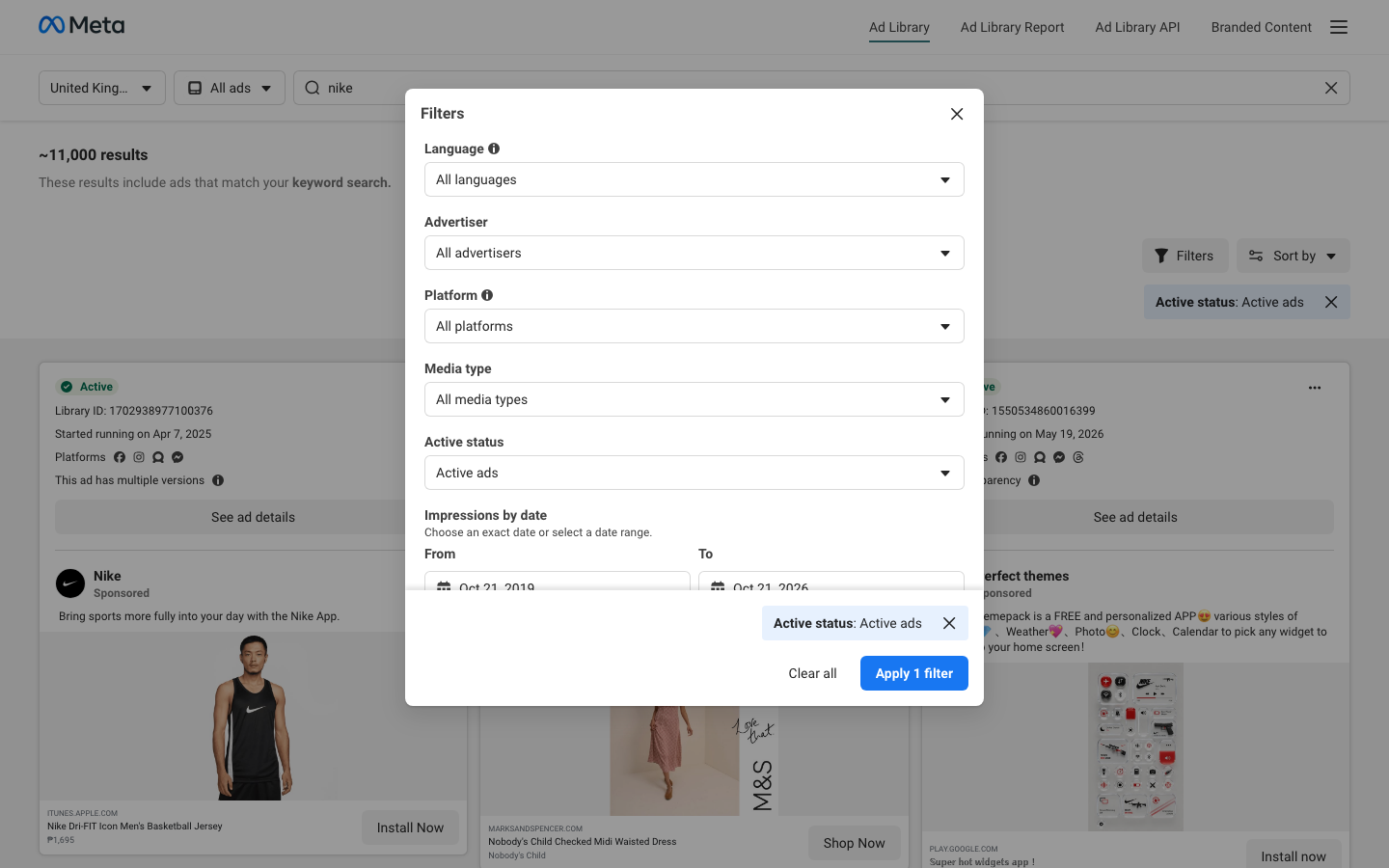
Open Meta Ad Library, select the country first, choose All ads for ordinary commercial research, and then search by advertiser or keyword. On the results page, open Filters and choose the platform you want to review. The applied platform appears as a filter chip above the ad cards.
Visual guide
The Meta Ad Library path
Click through the real product screens used in the steps below.
Step-by-step
How to Filter the Meta Ad Library by Country and Platform
- 01
Open Meta Ad Library and set the country first
Open Meta Ad Library and choose the country where you want to inspect delivery. This is the meaningful public filter for a normal competitor search. Pick the market where the competitor is expected to advertise, not the country where your team happens to be based.
- 02
Choose the right ad category
Choose All ads for ordinary commercial creative. Issues, elections or politics is a separate transparency category with different retention and data rules. Meta also lists housing, employment, and financial products and services as special categories in its API documentation, but do not use that documentation to assume that every public search control behaves the same way.
- 03
Search for the advertiser or a precise keyword
Enter the advertiser name when you want that brand’s visible ads, or use a narrowly relevant keyword when you are looking for a message or offer. Check the advertiser or Page name on each result before treating an ad as a competitor example. A keyword match can surface unrelated advertisers.
- 04
Use the Filters panel to choose a platform
Open Filters on the results page and choose the platform you want to review. The applied selection appears as a filter chip above the ad cards. Record the country and active-status settings with the platform filter so another person can reproduce the same view.
- 05
Use the API only when its published scope fits the question
If the task genuinely requires filtering API results by a Meta technology, Meta documents a publisher_platforms parameter. That API is for political and issue ads worldwide during the stated retention window, plus ads of any type delivered in the UK or EU during the past year. It also requires Meta’s published account, identity, location, developer-account, and app setup, so it is not a substitute for the public commercial-ad search.
Read the report
What the main metrics mean
Country
The market selected for the public Ad Library search. It determines the country-specific view you are investigating.
Platforms
The Meta technologies displayed for an individual ad record. Use them to classify observed examples, not to infer the advertiser’s whole placement mix.
Active status
Whether an ad card is marked active or inactive in the library view. It does not show spend, conversions, or profitability.
Started running
The delivery-start date shown on an ad record. It provides timing context, but does not prove uninterrupted delivery or budget level.
Before you continue
- Set the country that matches the market you are researching before drawing any conclusion from the results.
- Record the advertiser or Page name with each example so a keyword match is not misattributed.
- Confirm that the applied platform and active-status filter chips match the view you intended to review.
- Keep observations about creative, status, dates, and visible platforms separate from assumptions about targeting, spend, or results.
FAQ
Common questions
Can I filter Meta Ad Library results to show only Instagram ads for a competitor?
Yes. Set the country, search the advertiser, open Filters, and choose Instagram from the Platform selector. Confirm that the Platform: Instagram chip appears above the ad cards before reviewing the results.
Why do Meta Ad Library results change when I switch the country?
Meta Ad Library results can change when you switch country because the public search is designed around country-specific ad delivery and transparency views. Compare the same advertiser in each target market rather than assuming that one country’s results represent every campaign worldwide.
Does the Meta Ad Library API let an agency filter ads by Facebook or Instagram placement?
The Meta Ad Library API documents a publisher_platforms parameter for filtering within the API’s stated coverage. That coverage is not a general worldwide archive of commercial ads: it covers political and issue ads worldwide, plus any ads delivered in the UK or EU during the past year, and requires Meta’s documented onboarding steps.
Can I use the platform label in Meta Ad Library to prove where all of a competitor’s budget went?
A platform label in Meta Ad Library cannot prove how a competitor allocated its budget across Meta technologies. It identifies the technology shown for that public ad record, while ordinary commercial-ad search does not expose the advertiser’s spend, bids, conversions, or complete targeting setup.
What should I save when comparing a competitor’s Facebook and Instagram ads by country?
Save the country, advertiser or Page name, visible platform label, active status, start date, creative, message, and Library ID where shown. That record lets another person reproduce the observation without turning a public creative example into an unsupported performance claim.
Sources and further reading
This guide was checked against Meta Ad Library product documentation:
 Reviewed by Filipe Lins DuarteCo-Founder & CEO
Vast experience talking to customers and users to understand what good software looks like. Background spans commercial and product roles.
 Checked by John RiceCo-Founder & CTO
15+ years building tech products and web applications. Conducted hundreds of user interviews to know what a good product looks like.
Every Marketraa page follows our editorial standards.